
The editor that clears the way
Markdown.
No noise.
No limits.
Inkline is a desktop Markdown studio: viewer, editor and exporter in a single window. Your files stay on your machine, and the document renders while you type.
- Local-first
- No account
- No telemetry
Interactive Inkline demo
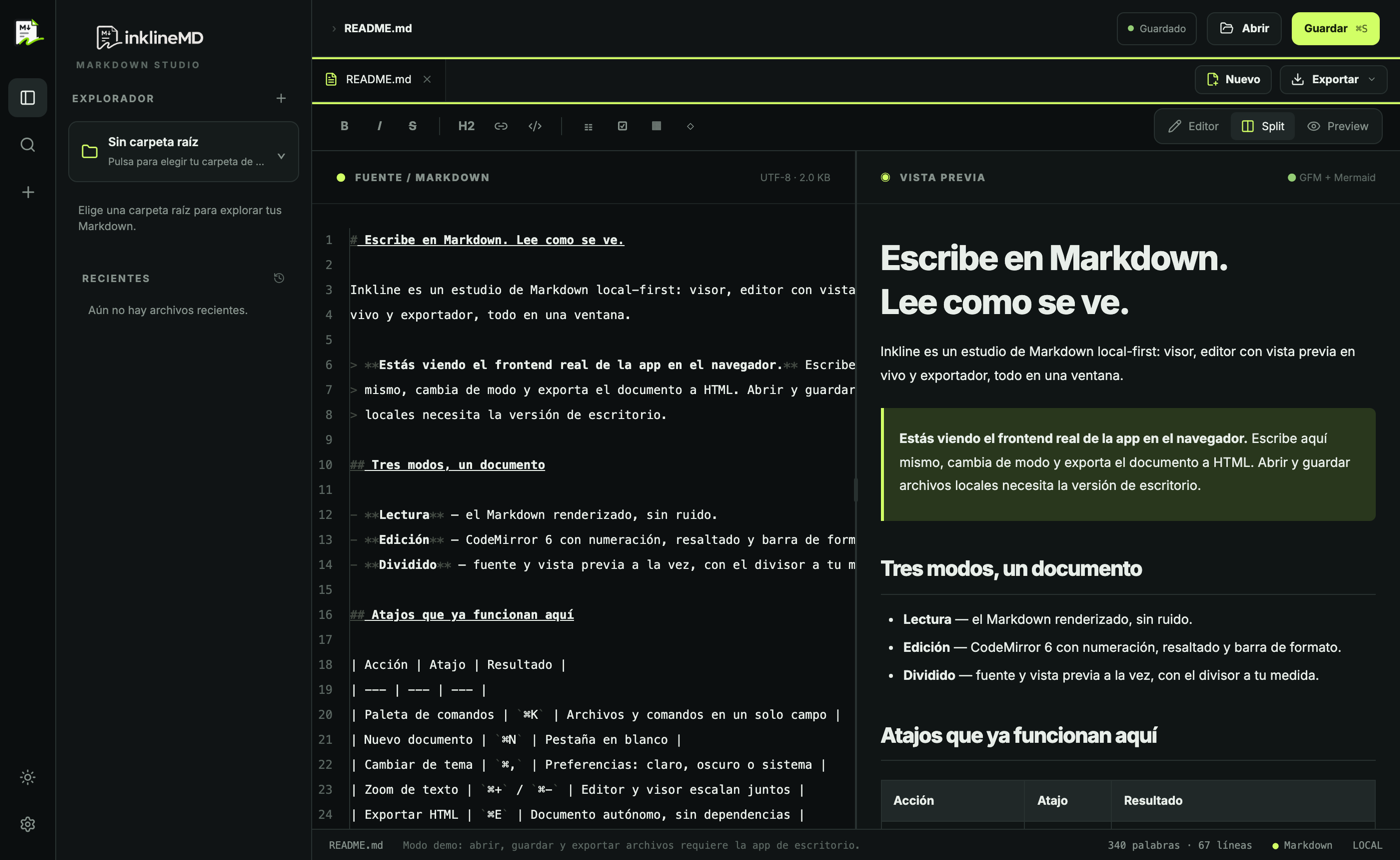
This is the real frontend of the app, without the desktop backend: opening and saving files needs Inkline.
Features
Enough to write, nothing in the way
Three modes, one workspace, and a way out to paper or HTML when the document is ready.
-
Three modes, one document
Reading, editing and a split view with live preview. The divider split is remembered per document.
-
File workspace
Folder tree, recents and open-document tabs. Switching files keeps both the cursor and the reading position.
-
Command palette
One field for everything with
⌘K: jump to a file, reopen a recent one or run a command. -
CodeMirror 6 editor
Line numbers, Markdown highlighting, a formatting toolbar, optional word wrap and your text size.
-
GitHub Flavored viewer
Tables, task lists and code blocks highlighted with Shiki. Reading gets a real line length.
-
Mermaid diagrams
mermaidblocks render inside the document: no second tool, no leaving the file. -
Export
Standalone HTML, a Markdown copy and Office formats (
.docx,.odt). Printing goes through the system browser. -
Settings that persist
Light, dark or system theme, an optional serif reading font and global zoom with
⌘+/⌘−. -
Local-first, for real
Files are written with write-then-rename and never leave your machine: no account, no server in between.
Under the hood
A native binary, not another browser tab
The interface is web; the window, the disk and the system dialogs are native.
| Shell | Tauri 2 (Rust) |
|---|---|
| UI | React 18 + TypeScript |
| Build | Vite 6 |
| Styling | Tailwind CSS 4 + shadcn/ui |
| Editor | CodeMirror 6 |
| Markdown | markdown-it (GFM) + Shiki + Mermaid |
Atomic writes
A temp file is written and renamed: a power cut never leaves a half-saved document.
No network by default
No sync, no telemetry. What you open is yours and stays where it is.
One window
Viewer, editor and exporter share the same document, position and theme.
Downloads
Installers
Version 0.2.0. Unsigned binaries: your OS will ask for confirmation the first time you open one.
-
Download .dmg
macOS
Your system -
Download .exe
Windows
Your system -
Linux
Your system
Installers for version 0.2.0 are served from the project CDN.
macOS Intel and Windows arm64 have no published binary yet.
Linux ships as a .deb (x86_64) that installs the package and uses the system WebKit on Debian, Ubuntu and derivatives.
Office (.docx / .odt) relies on macOS textutil: elsewhere the available exports are HTML and Markdown.
Before you download
Short questions
- What is the demo above?
- The real frontend of the app, compiled for the browser. Write, switch modes and export HTML; opening and saving local files needs the desktop version.
- Where do my documents live?
- Wherever you decide. Inkline only reads and writes the files you open, with atomic writes and no cloud copy.
- Why does the OS warn me when I open the installer?
- The binaries come from an independent project and are neither signed nor notarized. Use the “open anyway” flow on macOS or “more info → run anyway” on Windows.
- Is there a mobile or web version?
- No. Inkline is a desktop app: it needs file-system access. The browser demo shows the frontend; it is not a separate product.
- How do I build it?
- With Node 22+, pnpm and stable Rust:
pnpm install, thenpnpm tauri dev. The desktop build is packaged withpnpm tauri build. - Can I use the code?
- Yes: MIT license. The project is inklineMD; the app is Inkline.